Are G-SHOCK Watches Worth Buying? Benefits and Limits
Are G-SHOCK watches worth buying? Compare their durability, fit and features with a basic Casio, and learn which upgrades justify the cost.
October 6, 2026
The same G-SHOCK can work for commuting, weekends and travel — you don't need a different watch for every activity. What matters is deciding which compromise you can live with: a digital square or hands, replaceable batteries or solar charging, phone-assisted settings or phone-free automatic correction, and ordinary shock protection or added mud protection and sensors. This shortlist focuses on four exact configurations. They cover genuinely different needs without turning the decision into a tour of the whole catalog. Fit, legibility and the functions you'll actually use carry more weight here than the number of features on the box.
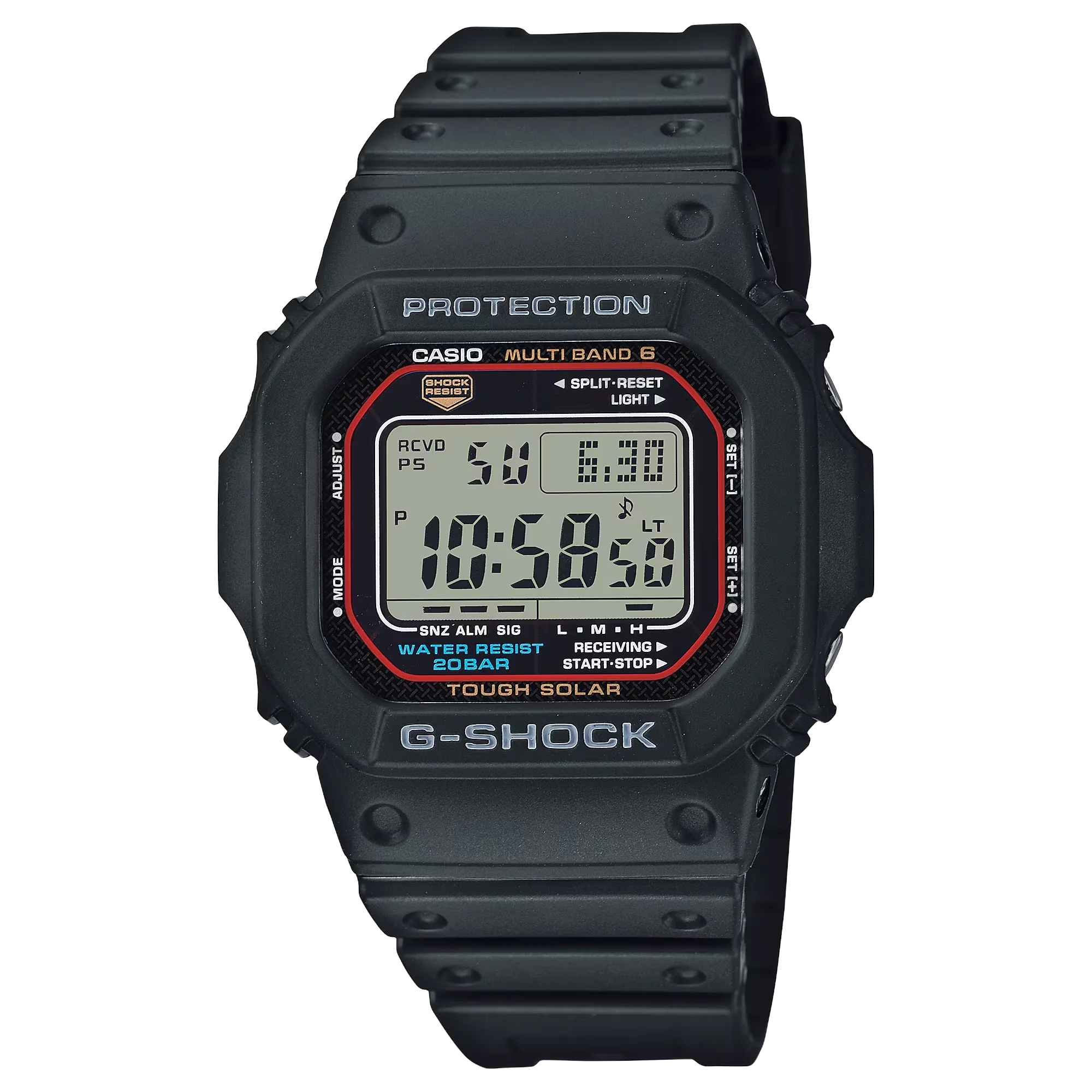
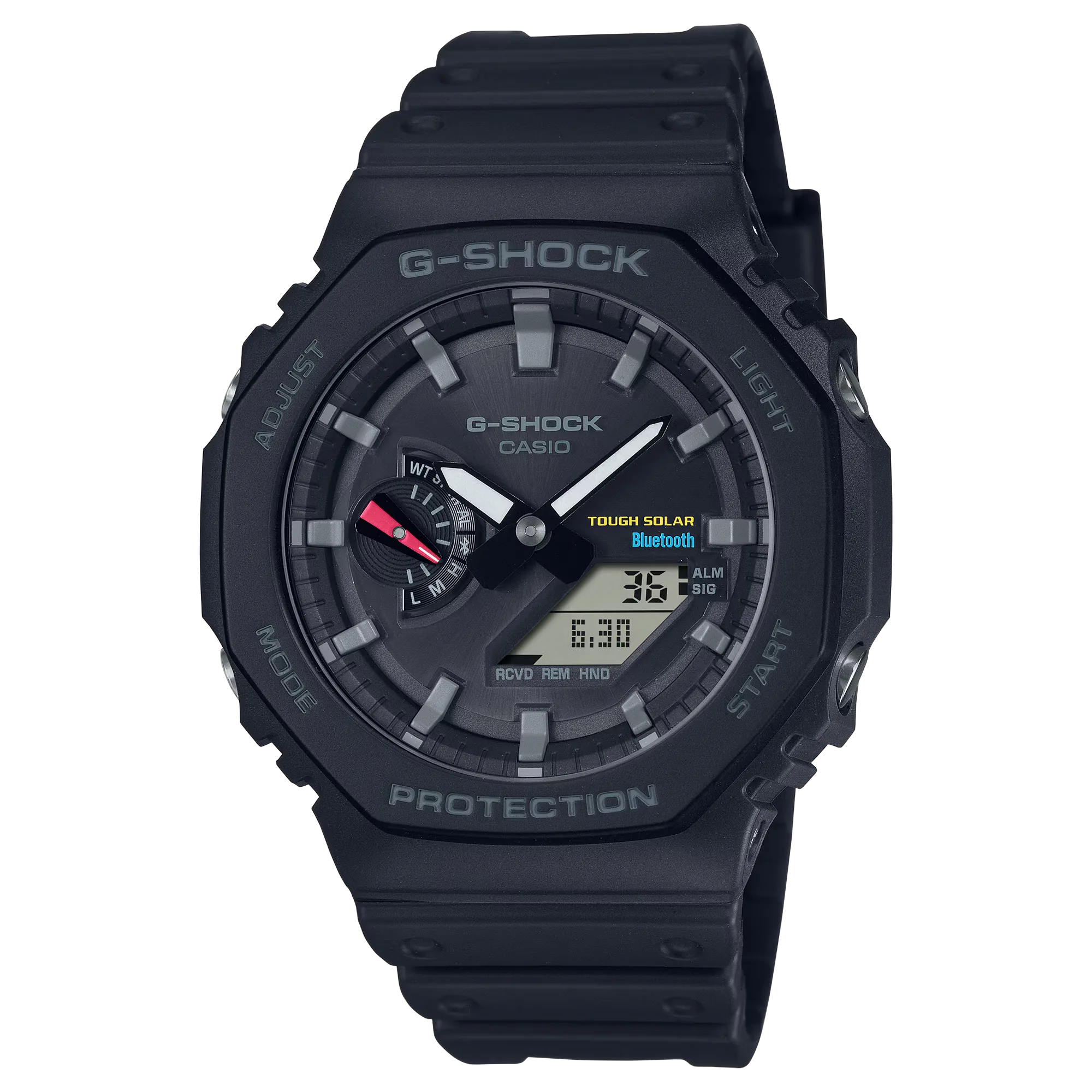
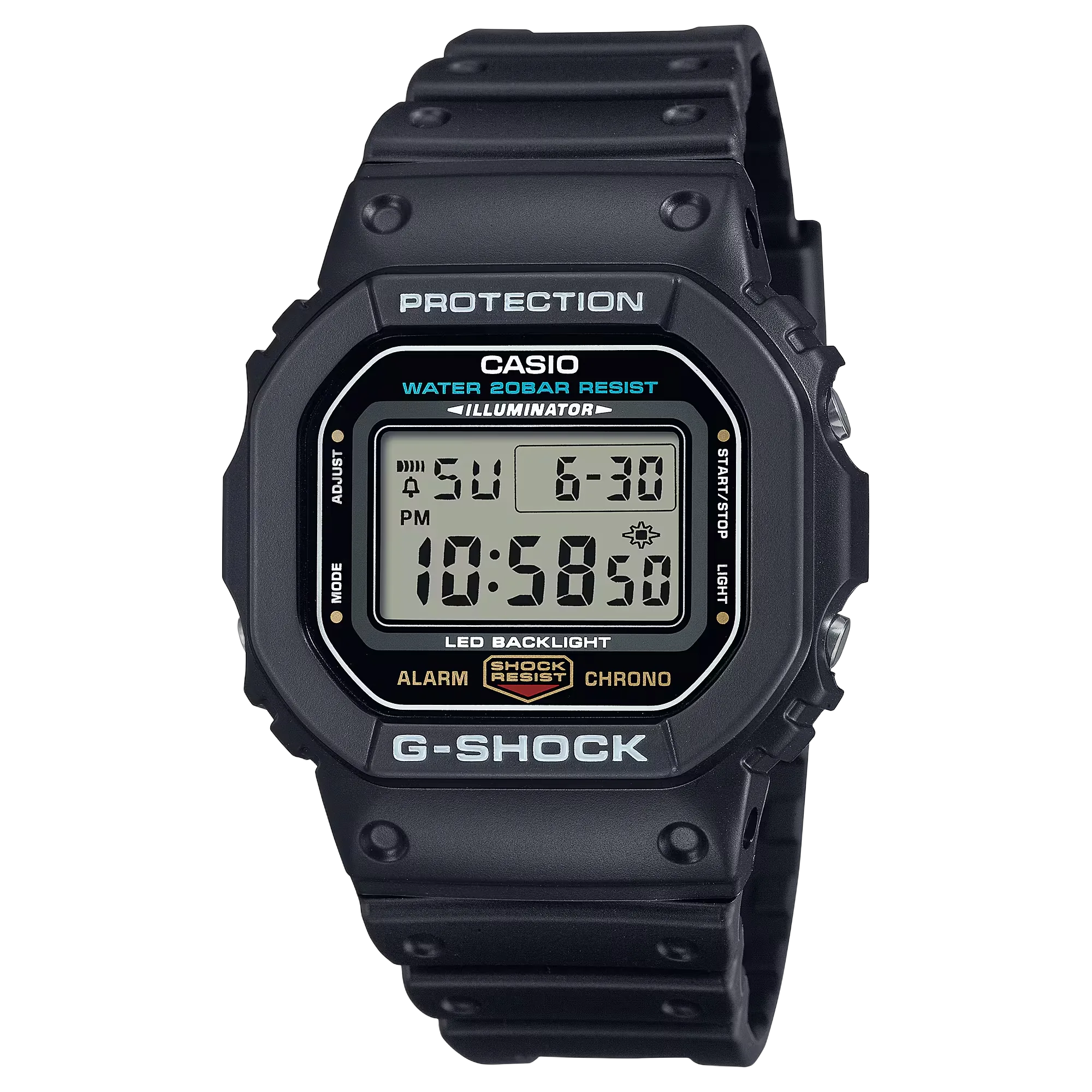
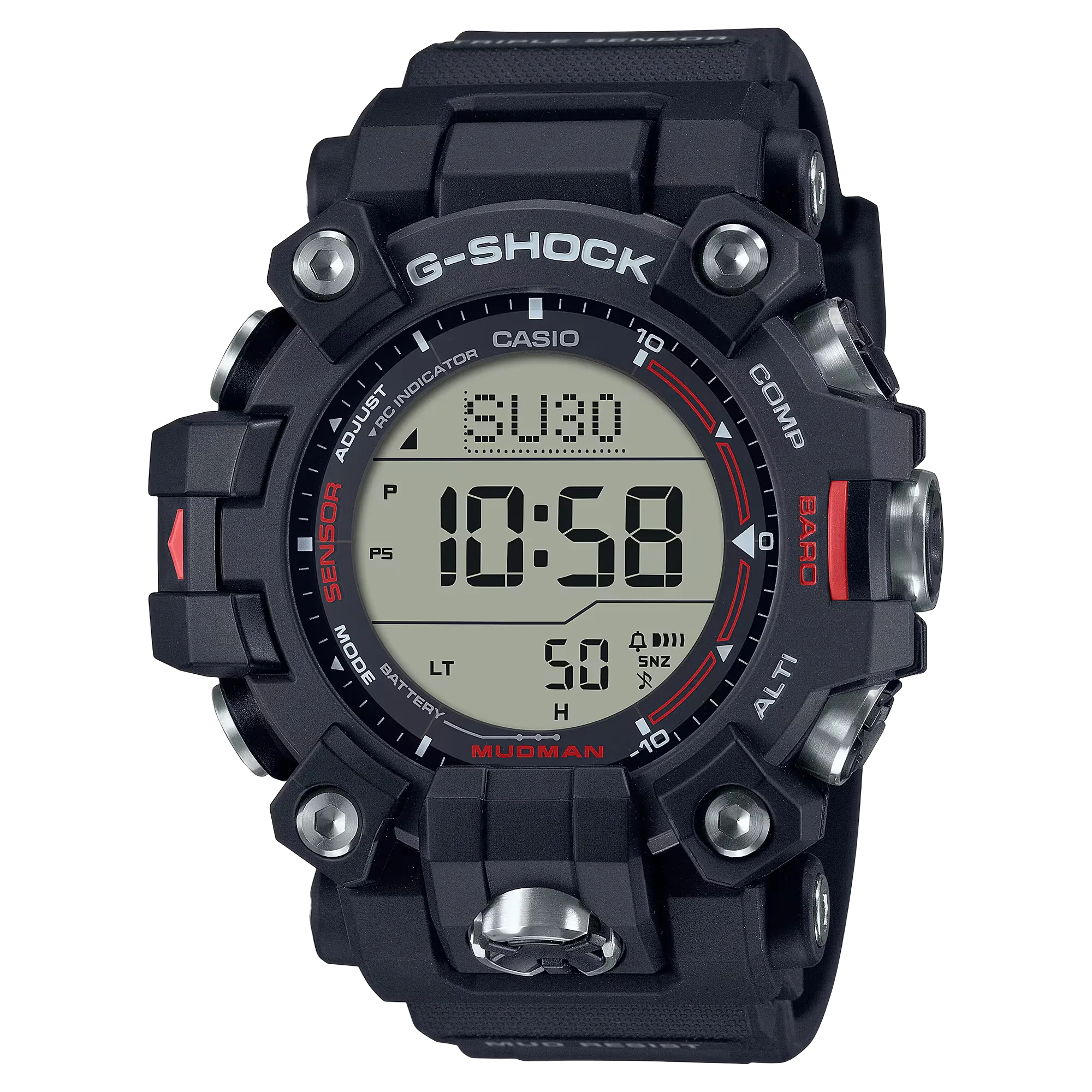
Start with the GW-M5610U-1 for everyday wear: it combines a relatively compact digital square with solar charging, radio time adjustment and a useful timer. Choose the GA-B2100-1A if you prefer hands and optional phone-assisted travel settings, the DW-5600UE-1 if you want straightforward battery-powered timing, or the GW-9500-1 MUDMAN if mud resistance and outdoor sensors will earn their extra size.
| Watch | Best starting point for | Case, L × W × H | Weight | Power and time adjustment | Maximum countdown |
|---|---|---|---|---|---|
| Casio G-SHOCK GW-M5610U | Everyday use and phone-free travel | 46.7 × 43.2 × 12.7 mm | 52 g | Tough Solar; Multi-Band 6 radio adjustment | 24 hours |
| Casio G-SHOCK GA-B2100 | Hands, desk wear and optional phone-assisted travel | 48.5 × 45.4 × 11.9 mm | 52 g | Tough Solar; Bluetooth via CASIO WATCHES | 60 minutes |
| Casio G-SHOCK DW-5600UE | Straightforward timing and workday knocks | 48.9 × 42.8 × 13.4 mm | 52 g | CR2016 battery; manual setting | 24 hours |
| Casio G-SHOCK GW-9500 | Muddy conditions and sensor-based outdoor use | 56.7 × 52.7 × 14.8 mm | 81 g | Tough Solar; Multi-Band 6 radio adjustment | 24 hours |
All four references above have manufacturer-specified shock resistance, 200-meter water resistance and mineral glass. They differ in dimensions, power, time adjustment and additional functions — not in that water-resistance rating.
Specifications use Casio's exact international product pages, except the GW-M5610U-1, for which the source is Casio's European page. Case measurements follow the manufacturer's length × width × height convention; case length is not an independently measured lug-to-lug span.
The timer column deserves attention. An analog-digital travel watch can be the wrong work watch if you regularly need a countdown longer than an hour. A sensor-equipped watch, on the other hand, may add little to daily life if you mainly need time, an alarm and a comfortable fit.
Before comparing features, decide how you want to read the time. Choose a square if digits should be the main way you read time and timing functions. Choose analog-digital if hands are your preferred everyday display and you're comfortable using a separate digital panel for the timer, date and other functions.
Neither format is automatically tougher: the exact references here share the same published water-resistance rating and manufacturer-listed shock protection. A square isn't the mandatory initiation into G-SHOCK, and an analog-digital design isn't an inferior choice just because it departs from the familiar silhouette.
Best for: someone who wants one digital G-SHOCK for ordinary daily wear, swimming, weekends and travel, without pairing a phone.
Why it works: the GW-M5610U-1 brings Tough Solar, Multi-Band 6, world time, five daily alarms including a snooze alarm, and a 24-hour countdown timer into the shortest case on this shortlist. Its 52 g weight matches the other two smaller watches.
Solar charging and radio correction cut down on routine battery and time-setting intervention when the watch gets adequate light and a suitable signal. It's the starting recommendation because those conveniences don't need the MUDMAN's larger case, and automatic correction doesn't rely on a phone connection.
Watch-outs: radio time adjustment isn't worldwide satellite synchronization. Reception depends on a supported location, settings and local conditions. You still need to choose the correct home city when traveling — receiving a time signal isn't the same as the watch automatically knowing where you landed.
It isn't the thinnest watch here. If cuff clearance matters more than an all-digital layout, compare the GA-B2100-1A in person — the square's shorter published case length is a sensible starting point for fit, but it doesn't prove comfort on your wrist.
Read the display at your normal viewing angle before buying. Casio's manual notes that LCD figures can be difficult to read from an angle. A digital layout is a reason to try the watch, not a guarantee of perfect readability for every wearer.
US sellers can use the older GWM5610-1 listing name for the updated GW-M5610U-1. Confirm the supplied U reference or module 3495 if you specifically want the updated generation, rather than treating an abbreviated listing title as proof.
Best for: someone who prefers an analog time display, likes an octagonal case and would value optional phone-app setup and world-time selection.
Why it works: the GA-B2100-1A adds Tough Solar and Bluetooth time adjustment through CASIO WATCHES. Its built-in world-time selection covers 38 cities plus UTC; the app lets you select from roughly 300 world-time cities. Home/world-time swapping lets you switch between origin and destination time.
At 11.9 mm, it's the thinnest model in this shortlist. That makes it a useful desk-wear candidate, not a promise of universal cuff clearance — the watch is still 45.4 mm wide, so its slimmer profile and the square's shorter case are different fit advantages.
It also has five daily alarms, a double LED light and a hand-shift function that moves the hands away from the digital display — an option for someone who wants hands for ordinary time reading but still uses digital timing functions.
The exact GA-B2100-1A has hour and minute hands plus a battery-level and mode indicator subdial, not a conventional central seconds hand; seconds appear in the digital display. If watching a seconds hand is part of what you enjoy about an analog watch, inspect this arrangement before choosing it.
Watch-outs: the countdown tops out at 60 minutes, unlike the 24-hour timers on the three digital models. Check the small digital display for your own eyesight and viewing angles rather than assuming it'll be as convenient as a full digital square.
Pairing is optional: basic timekeeping, alarms and the countdown remain usable without a phone. The phone-assisted conveniences need a compatible paired phone and the CASIO WATCHES app.
For a flight, Casio's procedure is to set the destination as World Time and disable automatic adjustment before boarding, then swap home/world time, re-enable adjustment and correct the time after arrival. Follow the manual and the operator's restrictions on radio transmission. Automatic adjustment also doesn't work for 24 hours after a home/world-time swap — use the manual's immediate time-adjustment procedure if you need correction sooner.
Don't confuse the GA-B2100-1A with the GA-2100-1A1. The B reference here has solar power and Smartphone Link; the similar-looking battery-powered GA-2100-1A1 isn't an interchangeable feature match.
Best for: someone who wants shock protection, a digital layout and a long countdown timer, without an app or radio-controlled setup.
Why it works: the DW-5600UE-1 keeps the core timing tools — a stopwatch, 24-hour countdown with auto-repeat, a multifunction alarm and an LED backlight. Casio estimates roughly five years of battery life on a CR2016 cell; that's a manufacturer estimate, not a guaranteed replacement interval.
It's a purposeful choice for workday knocks, short tasks, exercise and recreation when you prefer a conventional battery to managing light exposure. Buying the solar square instead adds convenience — it doesn't add a higher water-resistance rating.
Watch-outs: the DW is 13.4 mm thick, compared with the solar square's 12.7 mm. It has neither the world-time feature of the selected solar models nor their automatic time adjustment — it isn't the travel recommendation if frequently changing time zones is central to your use.
It also has no manufacturer-listed mud-resistant construction, unlike the GW-9500-1. Don't translate general toughness into approval for chemical exposure or a particular hazardous workplace.
US naming requires care here too: specialist reporting documents the updated DW-5600UE-1 being sold under the older DW5600E-1V listing name. Confirm the actual watch or module 3525 when the updated LED version and battery specification matter to you.
Best for: someone who will use compass, altitude and barometric-pressure readings, or whose activities make additional mud-resistant construction worthwhile.
Why it works: the GW-9500-1 MUDMAN adds a digital compass, pressure-based altimeter, barometer, thermometer, sunrise/sunset display and a dual-layer LCD. Tough Solar and Multi-Band 6 sit alongside world time and a 24-hour countdown timer. Casio specifies protective button components and gasket fittings intended to keep mud and dust out.
This is a functional change, not merely a larger version of the everyday square. If you actually need those readings or mud protection, it has a clear reason to be on the shortlist.
Watch-outs: its 56.7 × 52.7 × 14.8 mm case and 81 g weight make it the largest and heaviest of these four. Try it with the sleeves and equipment you use before paying for features that could make the watch less comfortable on ordinary days.
The sensors need judgment. Altitude is calculated from air pressure, so a pressure change can change the indicated altitude even when you haven't moved. Casio recommends regular calibration against a known local elevation.
Body heat, direct sunlight and humidity affect temperature readings. For a more useful ambient-air reading, Casio advises removing the watch, wiping it dry and leaving it in a well-ventilated place away from direct sunlight for about 20 to 30 minutes — don't treat the number on your wrist as an unaffected outdoor-air temperature.
The manual calls the measurements general reference readings and tells serious trekkers and climbers to carry another compass to confirm results. Buy the MUDMAN as a useful supplementary instrument, not as your sole navigation system.
Match the reference to how you actually spend your week, not to the most demanding day you can imagine it handling.
Start with the GW-M5610U-1 if you prefer a full digital display and phone-free automatic correction. Start with the GA-B2100-1A if you want hands and its thinner profile, then check cuff clearance and digital-display readability in person.
A G-SHOCK can be your office watch, but it doesn't have to be your answer to every dress code. Make the choice around your actual clothes and workplace, not a rigid rule that digital watches are unsuitable or that an analog-digital watch automatically looks formal.
Related guideOffice watches: a buyer's guide →
Choose the DW-5600UE-1 when a straightforward digital timer and ordinary shock protection are enough. The solar square is an alternative if you value its power and time-setting conveniences, especially if you also travel.
Move to the GW-9500-1 when mud protection or its sensor functions genuinely matter — but first check whether your employer permits a wristwatch for the task. Shock resistance doesn't establish chemical resistance, electrical protection or workplace approval; Casio's precautions warn against contact with solvents, gasoline and similar substances.
Choose the GA-B2100-1A when you want optional app-assisted settings and world-time selection. Choose the GW-M5610U-1 when you'd rather have a self-contained digital watch with radio correction and are willing to handle city and daylight-saving settings yourself.
A traveler who wants to change settings through an app has a reason to choose the GA-B2100. Someone who wants automatic adjustment independent of a phone has a reason to choose the solar square, subject to signal availability. Both can keep time away from a phone — check the home/world-time and daylight-saving settings rather than assuming a flight has configured the watch for you.
Related guideTravel watches: a buyer's guide →
For swimming, day walks, camping or general recreation, don't assume you need a sensor watch. The everyday square or the basic DW already supplies the listed shock protection and 200-meter rating.
Choose the MUDMAN when you can name the readings or mud protection you expect to use, and learn its calibration and measurement limits before relying on the output. All four share the same stated water-resistance rating, so a larger case alone doesn't buy a higher one.
Follow the exact manual for water use. Casio's 20-bar guidance permits swimming but prohibits air-tank scuba diving and operating the buttons while the watch is submerged or wet.
1. Identify the main job: everyday digital use, hands with optional phone-assisted travel, straightforward timing, or mud protection and outdoor readings.
2. Check the exact reference and generation. A different suffix, a missing B, or a legacy retailer name can change the watch's actual features.
3. Try the watch adjusted to your wrist. Check strap comfort, case clearance through normal wrist movement, sleeve clearance, viewing angles and button access.
4. Test the function you'll use most. A readable clock isn't enough if you struggle with the timer display, need more than a 60-minute countdown, or can't conveniently operate the controls.
5. Check the actual seller's price and supplied configuration. Justify spending more by a feature or construction difference you'll use — not a broad claim that every pricier G-SHOCK is automatically more capable.
A quick test for the display: ask what you look at most. If you mostly glance at the time through hands and only occasionally run a timer, the analog-digital model has a clear role. If digits and longer countdowns are central to your use, the square is the more natural choice. This is a selection rule, not a measured readability ranking.
Don't compare a solar watch's dark-storage operating reserve with a conventional battery's replacement lifespan. Solar power needs adequate light, and rechargeable capacity can decline over time. Resin bands also need cleaning and inspection — toughness doesn't eliminate care.
Choose the GW-M5610U-1 unless you have a clear reason to depart from it: hands and optional Bluetooth travel setup point to the GA-B2100-1A, straightforward conventional-battery timing points to the DW-5600UE-1, and genuine mud or sensor needs point to the GW-9500-1. Then let fit and legibility veto any candidate that looks right on paper but doesn't work on your wrist.
Take the 10h09 quiz to find watches that match your budget, wrist fit, style and everyday priorities.
“Choose the G-SHOCK that solves your ordinary week — not the one designed for the most extreme day you can imagine.”
The GW-M5610U-1 is the starting recommendation if you want a digital watch with solar power, radio adjustment and world time. The DW-5600UE-1 is the alternative if you prefer conventional battery power and don't need world time or automatic adjustment. Choose around those needs and actual fit rather than buying the largest watch you can afford.
For desk work, compare the GW-M5610U-1's shorter case with the GA-B2100-1A's thinner profile, and check your sleeves and preferred display. For workday knocks and timing tasks, the DW-5600UE-1 is a straightforward option. For mud or useful sensor readings, consider the GW-9500-1, but workplace rules take precedence over a watch recommendation.
Bluetooth is useful when you want optional phone-assisted settings and adjustment, as on the GA-B2100-1A. Multi-Band 6 offers phone-free radio correction on the GW-M5610U-1 and GW-9500-1, but only where the relevant signal can be received with suitable settings. The GA-B2100 also works unpaired — Bluetooth convenience shouldn't be mistaken for a requirement to carry a phone. Check the correct home/world-time and daylight-saving settings when traveling.
Not simply because you hike. A smaller G-SHOCK can be enough when you want time, alarms and general protection. The GW-9500-1 earns its place when you use its mud-resistant construction, compass, altimeter or pressure information. Its readings are general reference information — Casio calls for altitude calibration and an additional compass for serious trekking or climbing.
Begin your try-on with the GW-M5610U-1: its listed case length is 46.7 mm, the shortest here. Compare the GA-B2100-1A if thickness is the issue, because it's 11.9 mm thick but wider and longer than the square. No single wrist circumference guarantees a fit — the strap's shape, adjustment and rigid span matter alongside the published case measurements.
It's worth prioritizing when you want to reduce routine battery changes and are willing to give the watch adequate light. It doesn't remove all care or guarantee a lifetime rechargeable cell. The DW-5600UE-1 remains a valid alternative: its approximately five-year primary-battery figure is an estimate, not a promise, and it doesn't offer solar or automatic correction.
Are G-SHOCK watches worth buying? Compare their durability, fit and features with a basic Casio, and learn which upgrades justify the cost.
October 6, 2026Choose a G-Shock square by power, time adjustment, display and construction. Compare battery, solar, Bluetooth, metal-covered and full-metal options.
October 2, 2026Understand the G-Shock 2100 families: resin, solar Bluetooth, metal-covered, steel bracelet and full metal, plus compact CasiOak alternatives.
October 2, 2026Explore Casio G-SHOCK through its squares, 2100 designs and metal models. Understand the features, wrist fit and trade-offs before choosing yours.
October 2, 2026Compare compact G-SHOCKs by case size and band-compatibility range, including the GMA-P2100 and GMA-S2100, with practical advice on strap fit.
October 2, 2026